

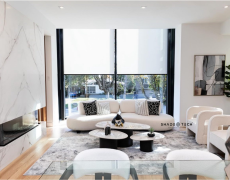








A west-facing Dallas living room can become noticeably warmer before lunch, while a bedroom with eastern exposure may need privacy before the first alarm goes off. That is why learning how to program shade schedules is less about picking a few clock times and more about matching each window to the way your home actually lives. Done well, automated schedules manage glare, heat gain, UV exposure, privacy, and daily comfort without requiring a second thought.
For motorized shades, the best schedule is rarely identical in every room. A polished smart-home setup uses the sun, the purpose of the room, and your household routine to make the right adjustment at the right time.
Start With What Each Room Needs
Before opening an app or creating an automation, walk through the home at the times that matter most. Notice where direct sun lands in the morning, afternoon, and late day. In North Texas, this step has real value: expansive glass, strong summer sunlight, and long cooling seasons can make one side of a home perform very differently from another.
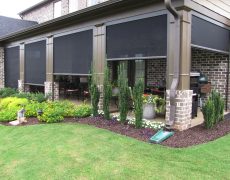
A kitchen may benefit from opening shades in the morning for natural light, then lowering solar shades partway as glare reaches the island. A media room may need shades down before the afternoon sun hits the screen. In a primary bedroom, privacy may matter more than daylight at dawn. For patios and outdoor living areas, motorized screens are often scheduled around the hottest and brightest portions of the day.
Set a clear priority for every zone. Usually, that priority is one of three things: daylight and views, solar control, or privacy. You can still achieve all three, but identifying the primary purpose prevents schedules that fight against how the room is used.
Choose Fixed Times or Sun-Based Automation
Most motorized shade systems can follow a fixed clock schedule, a sunrise or sunset trigger, or a smart-home routine. Each approach has a place.
Fixed times are predictable. For example, bedroom shades can lower at 9:30 p.m. every night and rise at 6:45 a.m. on weekdays. This is especially useful for children’s rooms, clinics, restaurants, and offices with regular hours. Fixed schedules also work well when privacy is the main goal.
Sunrise and sunset schedules adjust through the year. A living room shade can open 20 minutes after sunrise or close 30 minutes before sunset, even as daylight shifts between January and July. This is often the better choice for privacy-sensitive spaces because sunset is not a fixed time in Dallas.
For heat and glare, a third option can be even more effective: a sun-position, light-level, or temperature-based automation, if your selected control platform supports it. Rather than closing every shade at 2:00 p.m., the system responds when the room begins receiving direct exposure. This requires more careful setup and compatible sensors, but it can provide better comfort when weather and seasonal sun angles vary.
How to Program Shade Schedules by Exposure
The direction of each window should guide the schedule. A generic whole-home routine may look tidy in an app, but it often misses the reason automation was installed in the first place.
East-Facing Windows
East-facing rooms receive their strongest light early. Program shades to rise gradually around wake-up time if you want a natural start to the day. If early glare is a problem in a breakfast room, home office, or bedroom, keep the shades at a partially lowered position until the sun moves past the window.
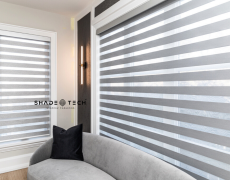
Dual shades are particularly useful here. A light-filtering fabric can soften the morning sun while preserving daylight, then retract fully once direct light is gone. Blackout layers are better reserved for sleep and full privacy rather than used as the default daytime setting.
South-Facing Windows
South-facing glass receives more consistent daylight, particularly in winter when the sun sits lower. These rooms often benefit from a measured approach rather than an all-or-nothing schedule. Program solar shades to lower to a selected percentage during periods of direct sun, maintaining exterior views while reducing glare and UV exposure.
The right openness factor and fabric selection make a major difference. A carefully specified solar shade can support the schedule by filtering light even when it is only partially lowered.
West-Facing Windows
West-facing windows deserve the most attention in Dallas-Fort Worth homes. Afternoon heat and low-angle sun can create harsh glare, hot furniture surfaces, and uncomfortable rooms just as families return home.
Set west-facing shades or exterior screens to lower before the sun becomes disruptive, not after the room has already heated up. Depending on the property, that may be early afternoon in summer and later in the day during cooler months. A schedule tied to solar conditions can outperform a fixed time for these exposures.
North-Facing Windows
North-facing rooms generally receive the most even, indirect light. These shades can often remain open longer, making them ideal for preserving views and daylight. Schedule them primarily around privacy, evening routines, or security preferences instead of heat control.
Create Useful Daily Routines, Not Random Automations
The most effective shade schedules align with meaningful moments in the day. Think in routines instead of individual commands.
A “Good Morning” routine might raise bedroom shades, open the kitchen shades, and leave west-facing shades in place until later. A “Leaving Home” routine can lower selected street-facing shades for privacy while keeping low-risk interior shades open for daylight. An “Evening” routine may lower shades in common areas before sunset and close blackout shades only when bedrooms are ready for sleep.
For smart-home households, voice assistants and centralized platforms add convenience, but they should not replace thoughtful scheduling. Alexa, Google Home, Apple Home, and Matter-compatible systems can coordinate shades with lighting, thermostats, and scenes. The practical goal is simple: fewer manual adjustments, not more commands to remember.
Commercial settings benefit from the same logic. A medical clinic may schedule lobby shades to reduce morning glare while keeping treatment rooms private. A restaurant may adjust shades before peak dinner service to control low sun without making the space feel closed off. Offices can use schedules to protect screens and improve employee comfort during the workday.
Program Partial Positions When the System Allows It
Many homeowners assume a scheduled shade must be fully open or fully closed. Partial positions are often the difference between a functional automation and one that feels too aggressive.
A solar shade lowered to 40% or 60% can cut glare while retaining daylight and a connection to the outdoors. In a room with large contemporary windows, this is usually more comfortable than closing every window covering at once. For privacy after dark, the schedule can move shades to a fully lowered position later in the evening.
The exact percentages depend on window height, fabric opacity, furniture placement, and sightlines from outside. A professionally measured and installed system gives you repeatable positions that look aligned across multiple windows, rather than a collection of shades stopping at slightly different heights.
Test Your Schedule Through a Full Week
Do not judge a shade schedule after one day. Test it across weekdays and weekends, sunny and overcast conditions, and the times when rooms are actually occupied. Give each automation a practical name so it is easy to identify and adjust later.
Watch for a few common problems. Shades that close too early can make a home feel dim. Shades that lower too late cannot prevent the heat that has already entered the room. A schedule that works in July may need refinement in December because the sun angle is different. This is normal, especially in homes with tall glass walls, clerestory windows, or outdoor spaces with changing shade from trees and structures.
Also build in manual control. Guests, entertaining, a work-from-home video call, or a cloudy afternoon may call for an override. Good automation should feel helpful, not restrictive.
Avoid These Common Scheduling Mistakes
One common mistake is grouping every shade in the house into one “open” and “close” command. It is convenient to set up, but it ignores solar exposure and room function. Another is relying entirely on sunset for heat control. Sunset is useful for privacy, yet west-facing glare may peak well before then.
Homeowners also sometimes schedule blackout shades to open at sunrise, only to find the room becomes too bright too quickly. In bedrooms, a gradual routine using light-filtering shades or a later opening time may be more comfortable. Finally, confirm that the motor limits and shade positions were set correctly during installation. If a shade does not stop where it should, the issue may be calibration rather than the schedule itself.
For a custom system, professional programming is worth considering when multiple rooms, dual shades, exterior screens, or several smart-home platforms are involved. ShadeoTech can configure schedules around the actual exposure, architecture, and daily use of a North Texas property, then make sure the controls are intuitive for everyone in the home.
The best shade schedule should quietly disappear into your day. When the room stays cooler, the glare is gone, privacy arrives at the right time, and the view remains available when you want it, your window treatments are doing exactly what they were designed to do.
